
A multi-agent extension of an existing multirotor simulation and control library.
Independent control loops, formation targets, vehicle lifecycle, and predictive separation.
Control calculations in Python connected to a physics simulation through a lightweight topic-based UDP bridge.
Project Scope#
This project was built for a robotics systems course. The underlying library, PID primitives, and original single-drone simulator were provided as the starting point; I did not write the complete robotics framework.
My work was the multi-drone extension on top of it: scaling the controller to several independent multirotors, calculating formation targets, managing drones at runtime, adding collision avoidance (trying my best to reduce the drones’ willingness to crash into each other…), and connecting those systems to a usable Godot swarm simulation.
The finished project is available on my project branch of the RoboticSystems repository
. The interesting part, however, is how it grew from the original example through a series of increasingly less isolated problems.
Scaling From One Drone to Four#
The original example already had the important low-level pieces: a Godot rigid body, four motor forces, and a cascaded PID controller, all implemented in simple Python, with a GDScript “bridge”. Position error becomes a velocity target, velocity becomes roll, pitch, and vertical-rate commands, and the attitude loops feed the motor mixer.
I preserved that controller and built the swarm in a separate Multirotor_multiple workspace. The first working result gave Godot a swarm scene and manager, while the notebook began reading several drone states and publishing a separate set of motor forces for each one.
The first problem was naming. A global X position or f1 motor topic is enough for one vehicle and immediately ambiguous for two, so every drone received a namespace: D0_X linked to D0_f1, D1_X linked to D1_f1, and so on, you get the idea.
The second problem was controller state. PID controllers remember previous errors of course, otherwise it would have been a P controller.
Reusing one controller across all drones would mix their integral and derivative histories, which is roughly as useful as steering four cars with one steering wheel. The notebook therefore keeps one Multirotor instance per drone.
The resulting loop was already close to the final architecture:
Godot rigid-body simulation
    -> D{i}_state topics
    -> Python controller[i]
    -> D{i}_f1 ... D{i}_f4 motor-force topics
    -> Godot physics
Godot publishes the state of the simulated bodies and one global tick. Python uses that tick to read the swarm, update each controller, and return four forces to the matching vehicle. The calculations stay in Python; Godot remains responsible for the simulation and visual presentation.
Turning Several Drones Into a Swarm#
At this point I had several drones taking off together, but several drones in one scene are not automatically a swarm.
So I came up with the simple concept of “Formations”: I have added line, triangle, square, and circle, along with add/remove controls, along with a top-down camera that made the result much easier to see.
Each formation is generated as a set of offsets around a shared origin. A line distributes drones evenly along one axis, a square uses a near-square grid, and a triangle fills successive rows. For a circle with \(n\) drones and spacing \(s\), each slot uses:
\[ \theta_i = \frac{2\pi i}{n}, \qquad \mathbf{o}_i = \left(s\cos\theta_i,\ s\sin\theta_i\right) \]This was also where formation changes introduced a less obvious problem. Assigning a shape is easy; getting every drone to a new slot without sending them through one another is not.
The solution evolved into a nearest-slot assignment and a FormationTargets manager. When the formation or active roster changes, the manager pairs drones with nearby available slots. It then moves their own personal setpoints toward those slots at a limited speed instead of changing positions instantly:
formation geometry -> assigned position target -> feedback controller -> motor forces
Nothing teleports. The existing controller still has to fly every drone into place. The greedy assignment is deliberately simple and works well for a maximum of six drones, although it does not guarantee the globally shortest set of routes.
Making the Swarm Fully Dynamic#
Once formations were in place, I thought it would have been cool to give the user (and thus, the professor) the ability to add or remove drones at runtime, while the simulation was running. Of course that meant handling all possible edge cases, which increased the code’s complexity quite a bit, but everything went fine. Both Godot and the Jupyter notebook supported a range between one and six active drones, starting with four, and every frame the roster would be published to Python.
The controller lifecycle had to follow that roster. A newly active ID receives its own controller; a removed ID loses its controller state and receives explicit zero-force commands before disappearing. This is easy to dismiss as cleanup in a simulation, but stale commands are a bad habit to carry into any control system.
The controller-side pattern is pleasantly small:
if drone_id not in controllers:
    controllers[drone_id] = Multirotor()

forces = controllers[drone_id].evaluate(delta_t, state, target)
publish_forces(dds, drone_id, forces)
Motor-force application happens inside Godot’s physics step, and formation handling responds to the actual active-drone count. That keeps the communication, controller, and physics lifecycles aligned rather than letting each side maintain its own idea of the swarm.
Adding Collision Avoidance Without Cheating#
Once formations could change at runtime, collision avoidance became the next problem. I wanted it to cooperate with the existing controller rather than bypass it with direct forces or position changes.
Avoidance therefore modifies the position target. Each nearby pair is processed once. If two drones are already too close, they receive equal and opposite horizontal separation offsets. Otherwise, the code predicts their closest approach from relative horizontal position \(\mathbf{r}\), relative intended velocity \(\mathbf{v}\), and a look-ahead horizon \(T\):
\[ t^* = \operatorname{clamp}\left( -\frac{\mathbf{r}\cdot\mathbf{v}}{\mathbf{v}\cdot\mathbf{v}}, 0, T \right), \qquad T = 1\,\mathrm{s} \]When that predicted distance is unsafe and the drones are closing, the algorithm adds an away vector and a small lateral correction. Corrections from multiple neighbors are accumulated, capped, and combined with the formation target before the PID cascade sees it.
This is deliberately not a one-to-one implementation of the well known Boids algorithm\(^{1}\). It borrows the idea of local neighbor-based behavior, but uses only separation and predicted closest approach; the classic alignment and cohesion rules are not part of this controller. The important part for this project is the layering:
formation target + avoidance offset -> final target -> PID controller -> motor forces
The swarm can react to a likely collision while every movement still passes through the same feedback-control path.
Making the Drones Follow the Target Dot#
The original formation origin was fixed. My Game Developer mind then came up with a cool idea: up until now, the simulation was not really interactive. The paths were hard-coded in code. So I added a draggable blue target dot visible in Godot and published its coordinates to the notebook on every movement.
That point acts as the formation centroid. Python reads its X, Y, and Z values, adds the current formation offsets, applies collision avoidance, and produces the final target for each active drone. Moving one point can therefore guide the whole group without adding a separate movement mode to every vehicle.
The drones do not chase the dot directly or collapse onto it. They preserve their assigned formation offsets around it, so dragging the dot moves the whole formation while the normal controller and avoidance layers remain active.
Making the Behavior Inspectable#
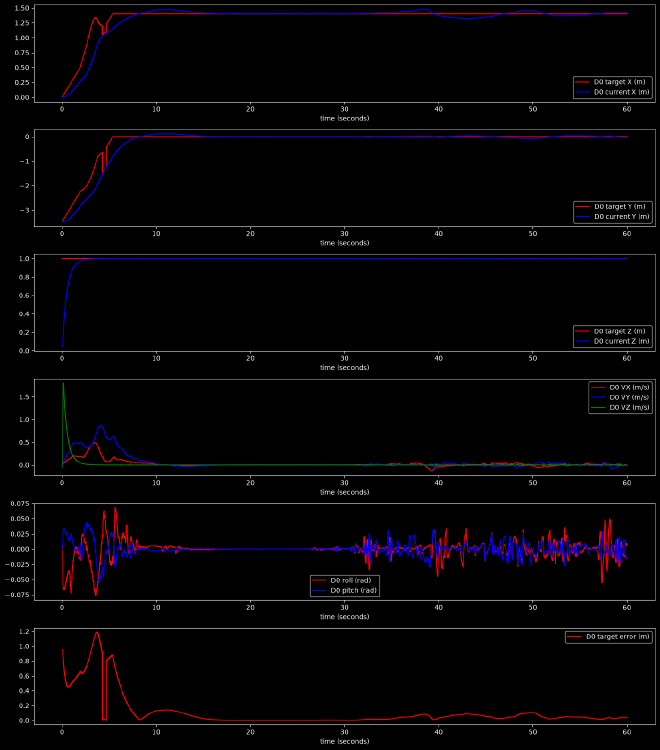
As the drones started to form shapes, change roster, avoid one another, and follow a shared point, simply watching them would not be enough to explain why something happened. I therefore built out a debug layer while I worked on the project. Godot can draw formation targets, avoidance vectors, neighbor counts, collision bounds, and whether a correction is direct or predictive. The notebook records position targets, measured motion, velocity, attitude, target error, and minimum inter-drone distance.
This was much more useful than deciding whether a controller change “looked about right.” Also managed to explain why drones would keep flipping over randomly sometimes (turns out they overcorrected an anticipated collision… or in other words, they got scared!)
Checking the Final Behavior#
Before publishing this article, I ran a \(60\,\mathrm{s}\) notebook run, with five drones placed at an altitude of \(1\,\mathrm{m}\) around a circle with spacing \(s=1.4\,\mathrm{m}\). The final positions visible in Godot, all expressed in metres of course, were \((1.40, 0.00)\), \((0.43, \pm 1.33)\), and \((-1.13, \pm 0.82)\), matching the evenly spaced offsets calculated by the formation manager.
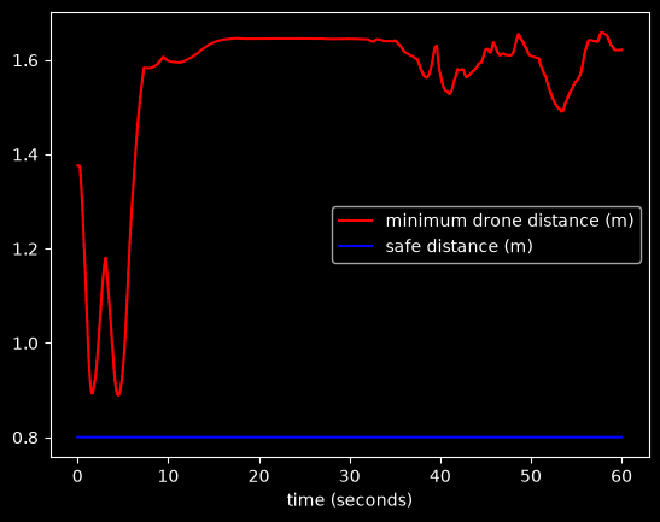
The closest approach occurred during the initial formation movement, with \(d_{\min}=0.889\,\mathrm{m}\) against the configured \(d_{\mathrm{safe}}=0.8\,\mathrm{m}\). This left a margin of \(0.089\,\mathrm{m}\). After the circle settled, the closest pair stayed roughly \(1.5\) to \(1.65\,\mathrm{m}\) apart for the remainder of the recorded run.
Final Thoughts and Limitations#
The most useful lesson from this project was that extending a controller is easy, dealing with the consequences of the change… not so much. Collision Avoidance easily becomes an issue, and we have not even scratched the issue of path finding with obstacles.
There are still clear limits. Yaw is not controlled, avoidance and movement are horizontal-only, and the greedy slot assignment is not optimal. The simulator also provides direct state rather than an estimator, and the course project’s DDS abstraction is, of course, a lightweight UDP topic bridge, kept as simple as possible for learning purposes.